Today i came across this really cool hack for google maps -> Google Maps Fligh Simulator.
It allows you to pick the city from where you want to take your flight and then drive your plane with arrow keys. It also has a link to add your city in it.
Enjoy and play with it.
Friday, August 18, 2006


Saturday, August 12, 2006
Snap - Another Search Engine
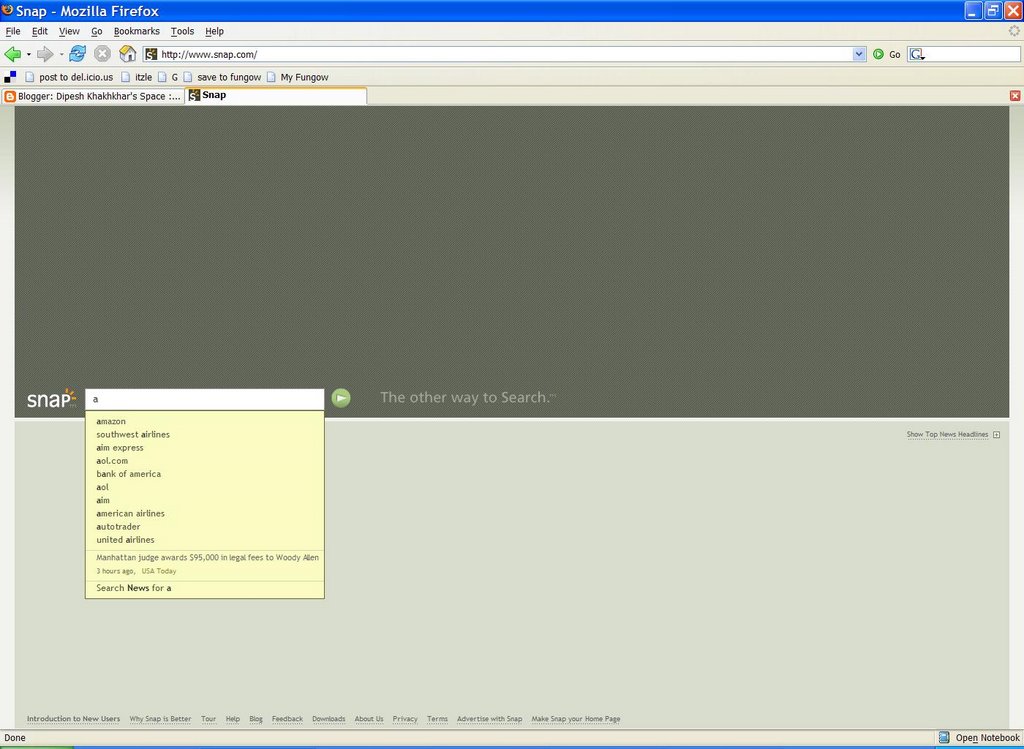
Snap another search engine in this heavily crowded search engine market. It is claiming that what is offered in market is not good or not what user wants to see and they are the one who have understood what user wants and provides them with fast, accurate and relevant results.
They have mentioned in their site that all big search engines use Text-In Text-Out method for searching and usually end user ends up with the following experience
And their search engine is different in the following way
Well i don't feel providing such features can embrace scalability, relevant result and user satisfcation. First thing which they need to think about providing relevant result using some technique like page ranking, content filtering, using anchor text etc. Secondly and most importantly think about scalability. Big search companies have enough money and infrastructure in place which has allowed them to have their search engine scable over the period of time.
I would love to see how they grow from where they are now. All the best to them.
They have mentioned in their site that all big search engines use Text-In Text-Out method for searching and usually end user ends up with the following experience
| 1. Type a keyword into a search box and hit enter |
| 2. Wait a bit, then |
| 3. get a list of 20 or so text results split into non-paid and sponsored links |
| 4. Proceed to decipher each link and excerpt (does this site have what I’m looking for? Is it spam?) |
| 5. Click on a link and go to the site. If you’re lucky, that’s it. |
| 6. But most of us aren’t lucky, so you go back to your results page and begin the process again. |
| 7. And repeat as often as needed for as long as your patience can muster. (Most searchers don’t get off the first page of results, even though we’re comforted that there are millions of results for some of our queries…) |
| 8. If this doesn’t yield the result you’re looking for, you probably go back to the original query and try a new modification. |
| 9. And repeat the process again as needed. |
And their search engine is different in the following way
- Quick visual dispaly of results preview. (On mouse over ajax request or on key down or on select ajax request and getting data in right pane
- Activity anticipating user's intent (Autocomplete on keyup by sending ajax request on key up)
- Direct interactivity with your search (As search result and web page contents are in two panes this can be achieved without much hassle)
- Better relevance through successful past result (Implementing voting and ranking system taking user input
Well i don't feel providing such features can embrace scalability, relevant result and user satisfcation. First thing which they need to think about providing relevant result using some technique like page ranking, content filtering, using anchor text etc. Secondly and most importantly think about scalability. Big search companies have enough money and infrastructure in place which has allowed them to have their search engine scable over the period of time.
I would love to see how they grow from where they are now. All the best to them.
Monday, August 07, 2006
Listen PDF documents rather than reading
Sometime you want to listen to some document while you are busy doing something. It is possible with adobe acrobat reader (I have tested the following shortcuts for version 7.* and it works fine)
Ctrl+shift+b - to hear the entire Document
Ctrl+shift+v - to hear the page
Ctrl+shift+c - to resume
Ctrl+shift+e - to stop
Well the reading is not great but it can do the job if you want something humming while you are performing some other task. Nice way of multitasking :)
The reading is more like running commentary which we observe in some sports.
Ctrl+shift+b - to hear the entire Document
Ctrl+shift+v - to hear the page
Ctrl+shift+c - to resume
Ctrl+shift+e - to stop
Well the reading is not great but it can do the job if you want something humming while you are performing some other task. Nice way of multitasking :)
The reading is more like running commentary which we observe in some sports.
Software Configuration Managment - All about source control
In my opinion every software developer and a computer science or engineering student who writes software programs should know about Software Configuration management or SCM.
It helps in maintaining your code base for each program over a period of time. You can always go back to your older version or see how you have refactored your source code over the period of time. It helps in learning agile development methodology for software development which is an essence of writing great software product.
Eric Sink is writing online book describing about source control.
Some of the free available SCM tools are
1) Subversion
2) Perforce
I won't recommend to use VSS even if you get it for free.
Other SCM tools which i have used for a while is Clear Case by IBM (formerly rational).
It helps in maintaining your code base for each program over a period of time. You can always go back to your older version or see how you have refactored your source code over the period of time. It helps in learning agile development methodology for software development which is an essence of writing great software product.
Eric Sink is writing online book describing about source control.
Some of the free available SCM tools are
1) Subversion
2) Perforce
I won't recommend to use VSS even if you get it for free.
Other SCM tools which i have used for a while is Clear Case by IBM (formerly rational).
Monday, July 31, 2006
Javascript Prototype Library for AJAX - Synchronous Request
I am a big fan of Prototype library and using it for a while with excellent results for most of my AJAX work.
Most of the time i was making asynchronous request to get the response. Today i was trying to make a synchronous request using the following in my request page
My response page is simple php page echoing some message which is. testResponse.php is as under
With this request setting for my AJAX call i.e. synchronous request is made with asynchronous request set to false. I am not able to fire onComplete method but when i change asynchronous request to true I am able to fire the function registered for my onComplete event.
Then i started looking in my livehttpheader whether request is getting fired at all or not. You guessed it right, request is not going from javascript.
I was not sure is it a bug in prototype library or I am doing something wrong. Later i found that i was passing parameters incorrectly. I have to change the way i was passing parameter i.e.
asynchronous: 'false'
and VOILA it works!!
So it was my editor which was showing keyword when it typed false without single quote and i have kept it like that :)
Most of the time i was making asynchronous request to get the response. Today i was trying to make a synchronous request using the following in my request page
<HTML> <HEAD> <TITLE> New Document </TITLE> <script src="./src/js/prototype.js" type="text/javascript" > </script> <script language="JavaScript" type="text/javascript" > function makeRequest() { var myAjax = new Ajax.Request( "testResponse.php", { method: 'post', asynchronous: false, onComplete: displayResponse }); } function displayResponse(xmlhttp) { alert("Am i coming here "); xmlhttp = null; } </script> </HEAD> <BODY> <table> <Tr> <td> < href='javascript:makeRequest("abc")' >Click me </a> </td> </tr> </table> </BODY> </HTML> |
My response page is simple php page echoing some message which is. testResponse.php is as under
<?php echo "What i am sending from here"; ?> |
With this request setting for my AJAX call i.e. synchronous request is made with asynchronous request set to false. I am not able to fire onComplete method but when i change asynchronous request to true I am able to fire the function registered for my onComplete event.
Then i started looking in my livehttpheader whether request is getting fired at all or not. You guessed it right, request is not going from javascript.
I was not sure is it a bug in prototype library or I am doing something wrong. Later i found that i was passing parameters incorrectly. I have to change the way i was passing parameter i.e.
asynchronous: 'false'
and VOILA it works!!
So it was my editor which was showing keyword when it typed false without single quote and i have kept it like that :)
Subscribe to:
Posts (Atom)


 Posts
Posts


